Skip to content

Working with the Catalog Address Space

課程內容

22內容頁
22靜態圖像頁
7圖像補充說明頁

課程導入

Page 1內容頁1 張圖像161 字元

Working with the Catalog Address Space - Working with the Catalog Address Space
Working with the Catalog Address Space Working with the Catalog Address Space - Working with the Catalog Address Space screenshot
Working with the Catalog Address Space (content)
課程正文

型錄位址空間作業 模組

繼續使用本教材,即表示您同意這些條款與條件。Interskill Learning Pty. Ltd. © 2024

Address spaceCatalog
學習檢核
  • 能用自己的話說明「Working with the Catalog Address Space」在本 topic 中的用途。
  • 能辨識 Address space、Catalog 的基本角色。
  • 能判斷本頁內容應回到哪一個大型主機工作情境中使用。
Page 2內容頁1 張圖像606 字元

Working with the Catalog Address Space - Objectives

Working with the Catalog Address Space Working with the Catalog Address Space - Objectives screenshot
Objectives (content)
課程正文

目標 — 處理型錄位址空間

本模組將介紹 z/OS 型錄結構,並說明在存取資料集時如何使用它。

您將檢視識別型錄爭用的相關步驟以及用來解決這些問題的指令。您也會看到其他常見的型錄問題及其修復流程。

完成本模組後,您應該能夠:

  • 描述型錄的組件及其功能
  • 使用指令來識別並解決型錄爭用
  • 識別用於分析型錄效能的報表指令
Address spaceData setCatalog
學習檢核
  • 能用自己的話說明「Objectives」在本 topic 中的用途。
  • 能辨識 Address space、Data set、Catalog 的基本角色。
  • 能判斷本頁內容應回到哪一個大型主機工作情境中使用。
Understanding Catalogs

Page 3圖像內容頁1 張圖像3 項補充說明413 字元

Working with the Catalog Address Space - Introduction

Working with the Catalog Address Space Understanding Catalogs: Working with the Catalog Address Space - Introduction screenshot
Introduction (html-wrapper)
圖像補充說明
互動項目 1

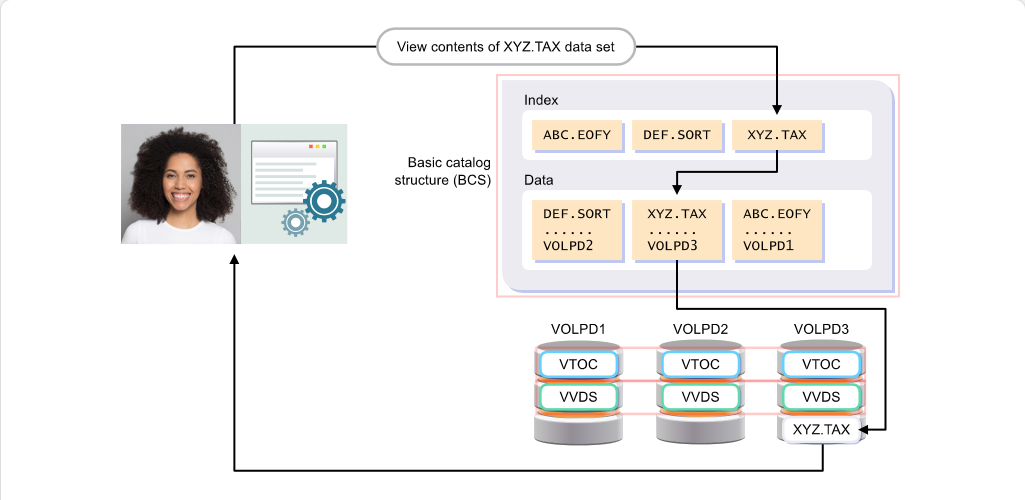
基本型錄結構 (BCS) 是一個 VSAM 資料集,包含系統上儲存之資料集的詳細資訊。

課程正文

線上使用者與批次作業可以參考資料集,系統能夠定位這些資料集。系統之所以能做到這點,是因為型錄。

所有由 VSAM 與 SMS 管理的資料集都必須納入型錄,亦即在型錄中建立一則條目,該條目包含資料集名稱、位置、擁有者與關聯資訊。

將滑鼠移到此處所示的型錄元件上,以檢視它們的用途說明。

Data setCatalog
學習檢核
  • 能用自己的話說明「Introduction」在本 topic 中的用途。
  • 能辨識 Data set、Catalog 的基本角色。
  • 能把互動圖像中的元件改寫成前後順序清楚的流程說明。
  • 能判斷本頁內容應回到哪一個大型主機工作情境中使用。
Page 4圖像內容頁1 張圖像389 字元

Working with the Catalog Address Space - Master Catalog

Working with the Catalog Address Space Understanding Catalogs: Working with the Catalog Address Space - Master Catalog screenshot
Master Catalog (html-wrapper)
課程正文

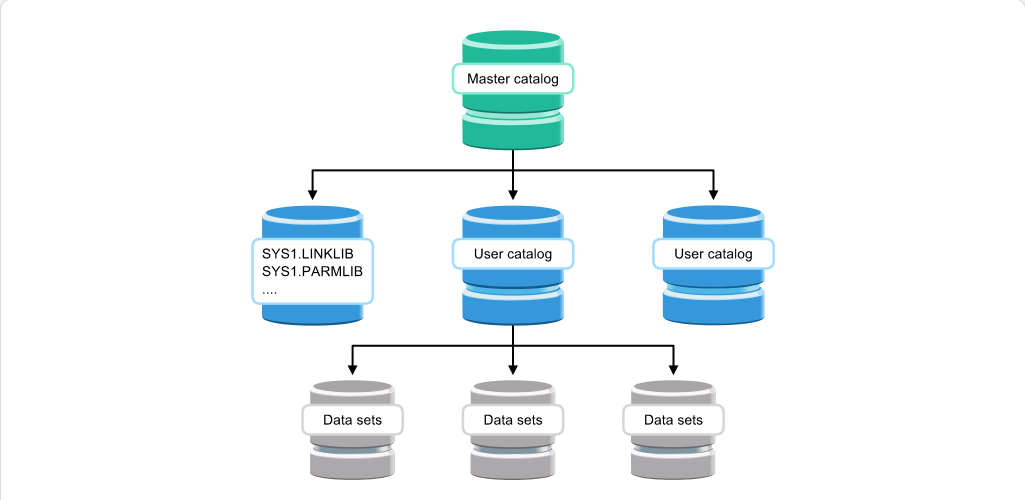
前一頁所示的基本型錄結構 (BCS) 可分類為主型錄或使用者型錄。每一個系統會有一個主型錄,其中包含所有使用者型錄及其別名的詳細資料。

一些重要的系統資料集,例如 SYS1.LINKLIB 與 SYS1.PARMLIB,也必須在主型錄中被參照,以確保系統能正確初始化。

System data setPARMLIBData setCatalog
學習檢核
  • 能用自己的話說明「Master Catalog」在本 topic 中的用途。
  • 能辨識 System data set、PARMLIB、Data set、Catalog 的基本角色。
  • 能判斷本頁內容應回到哪一個大型主機工作情境中使用。
Page 5圖像內容頁1 張圖像351 字元

Working with the Catalog Address Space - Catalog Address Space

Working with the Catalog Address Space Understanding Catalogs: Working with the Catalog Address Space - Catalog Address Space screenshot
Catalog Address Space (html-wrapper)
課程正文

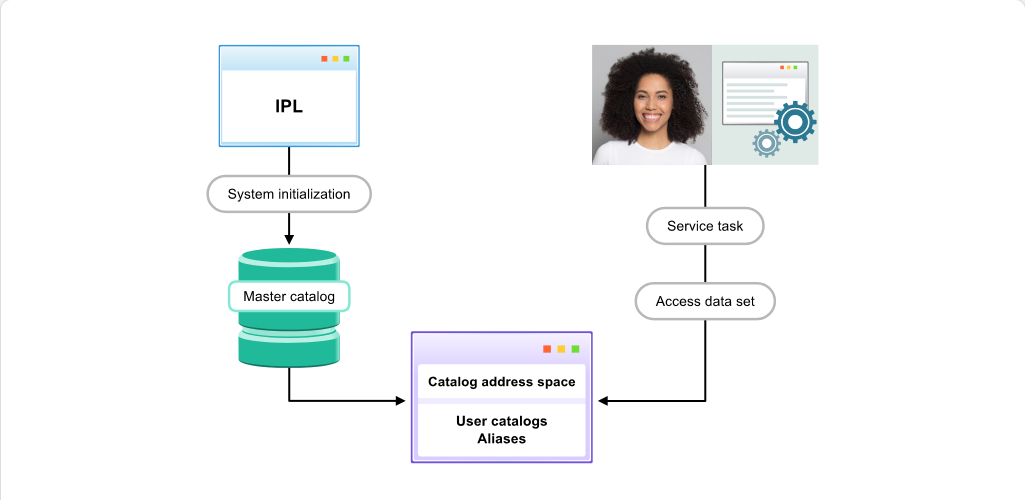
作為系統初始化的一部分,所有位於主型錄上的使用者型錄名稱及其別名都會被置入型錄位址空間(CAS)中的表格。

在系統初始化之後,任何使用者所請求的型錄功能(例如存取或建立資料集)都由 CAS 處理。這些單一使用者的請求稱為服務工作。

Address spaceData setCatalog
學習檢核
  • 能用自己的話說明「Catalog Address Space」在本 topic 中的用途。
  • 能辨識 Address space、Data set、Catalog 的基本角色。
  • 能判斷本頁內容應回到哪一個大型主機工作情境中使用。
Page 6圖像內容頁1 張圖像406 字元

Working with the Catalog Address Space - CAS Activity

Working with the Catalog Address Space Understanding Catalogs: Working with the Catalog Address Space - CAS Activity screenshot
CAS Activity (html-wrapper)
課程正文

如同 z/OS 系統的大多數元件,CAS 幾乎不需要操作員介入。瞭解如何透過 CAS 檢查型錄活動的狀態,可協助操作員隔離問題或檢查掛起作業的狀態。型錄指令可用於下列用途:

  • 取得型錄工作活動與狀態的詳細資訊
  • 修復暫時性型錄問題
  • 消除型錄資源爭用
Catalog
學習檢核
  • 能用自己的話說明「CAS Activity」在本 topic 中的用途。
  • 能辨識 Catalog 的基本角色。
  • 能判斷本頁內容應回到哪一個大型主機工作情境中使用。
Page 7內容頁1 張圖像1398 字元

Working with the Catalog Address Space - CAS Reports

Working with the Catalog Address Space Understanding Catalogs: Working with the Catalog Address Space - CAS Reports screenshot
CAS Reports (content)
課程正文

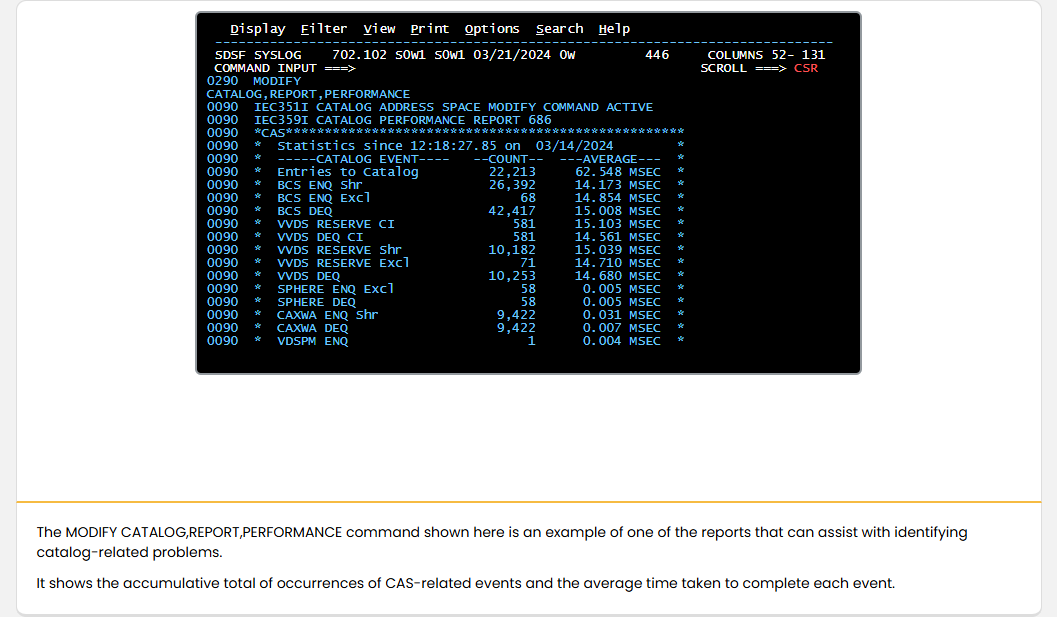
此處顯示的 MODIFY CATALOG,REPORT,PERFORMANCE 指令,是可協助識別與型錄相關問題之報告範例之一。

它顯示 CAS 相關事件發生次數的累積總計,以及完成每項事件所需時間的平均值。

Address spaceCatalogSDSF
學習檢核
  • 能用自己的話說明「CAS Reports」在本 topic 中的用途。
  • 能辨識 Address space、Catalog、SDSF 的基本角色。
  • 能指出畫面中應觀察的欄位、命令區、狀態列或清單。
  • 能判斷本頁內容應回到哪一個大型主機工作情境中使用。
單元摘要

Page 25內容頁1 張圖像571 字元

Working with the Catalog Address Space - Summary

Working with the Catalog Address Space Quiz: Working with the Catalog Address Space - Summary screenshot
Summary (content)
課程正文

摘要:使用型錄位址空間

在本模組中,您已瞭解 z/OS 型錄結構,並看到在存取資料集時它如何被使用。

您檢視了識別型錄爭用所涉及的步驟以及用來解決這些問題的指令。您也了解了其他常見型錄問題及修復它們的流程。

您現在應該能夠:

  • 描述型錄的組成元件及其功能
  • 使用指令識別並解決型錄爭用
  • 識別用於分析型錄效能的報告指令
Address spaceData setCatalog
學習檢核
  • 能用自己的話說明「Summary」在本 topic 中的用途。
  • 能辨識 Address space、Data set、Catalog 的基本角色。
  • 能判斷本頁內容應回到哪一個大型主機工作情境中使用。
Catalog Contention

Page 9圖像內容頁1 張圖像4 項補充說明276 字元

Working with the Catalog Address Space - Introduction

Working with the Catalog Address Space Catalog Contention: Working with the Catalog Address Space - Introduction screenshot
Introduction (html-wrapper)
圖像補充說明
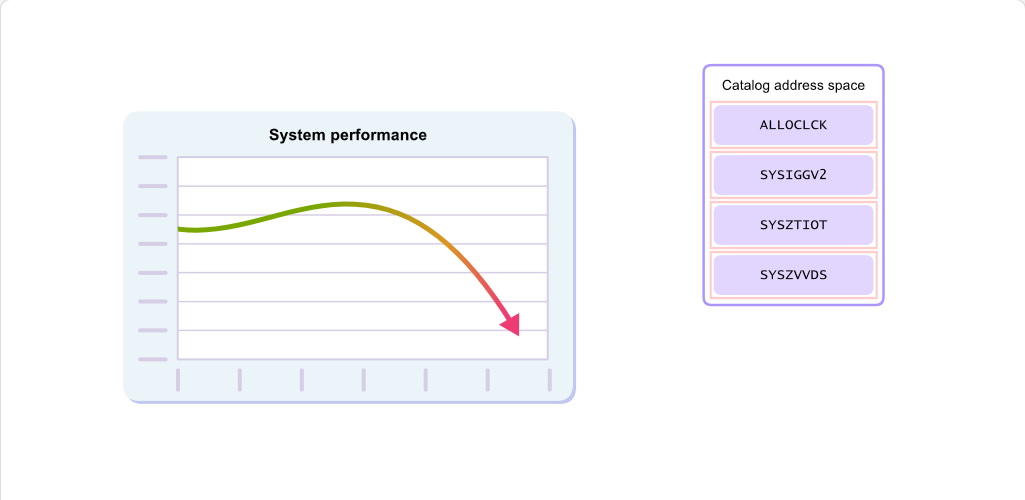
ALLOCLCK

此資源為內部 CAS 鎖定,用以保護資料集的配置、解除配置、開啟與關閉。

課程正文

如你所料,由於型錄的重要性,任何與型錄相關的爭用都可能大幅影響系統效能。CAS 有四項資源可自動監控其爭用情形。

將滑鼠游標移到這些資源上方,以檢視其用途說明。

Catalog
學習檢核
  • 能用自己的話說明「Introduction」在本 topic 中的用途。
  • 能辨識 Catalog 的基本角色。
  • 能把互動圖像中的元件改寫成前後順序清楚的流程說明。
  • 能判斷本頁內容應回到哪一個大型主機工作情境中使用。
Page 10內容頁1 張圖像2 項補充說明1242 字元

Working with the Catalog Address Space - Displaying Catalog Contention Defaults

Working with the Catalog Address Space Catalog Contention: Working with the Catalog Address Space - Displaying Catalog Contention Defaults screenshot
Displaying Catalog Contention Defaults (content)
圖像補充說明
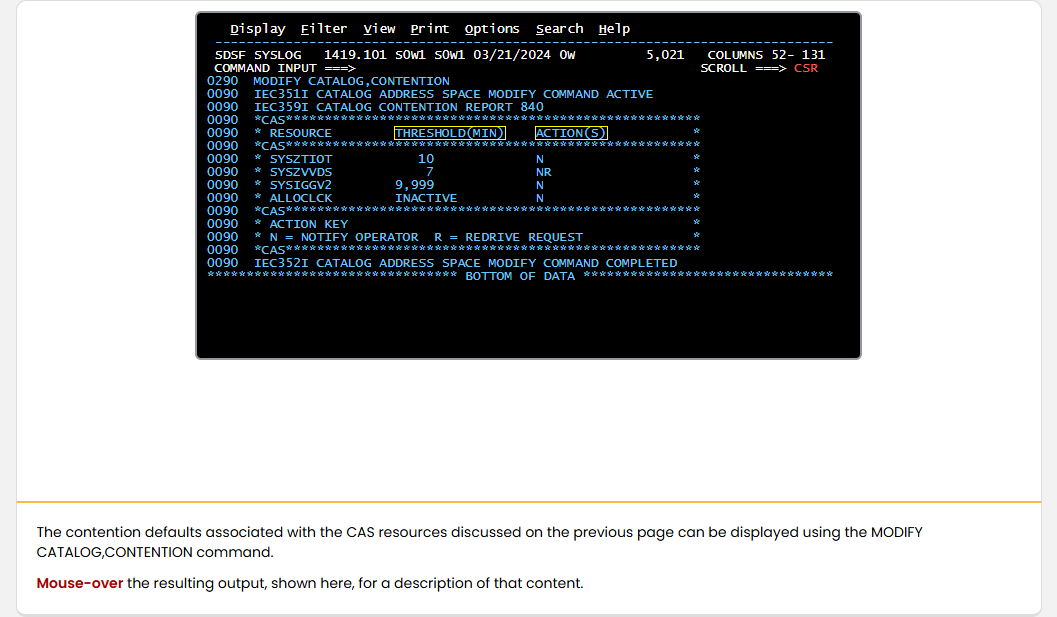
THRESHOLD(MIN)

這是以分鐘為單位所指定的時間,系統會等待正在使用該資源的工作。經過指定時間後,將執行 ACTION(S) 欄所顯示的動作。可指定的最小時間為 5 分鐘,最大為 9999 分鐘。若門檻值設為 INACTIVE,表示已停用該資源的資源競爭檢查。

課程正文

可使用 MODIFY CATALOG,CONTENTION 指令來顯示與前一頁所討論之 CAS 資源相關聯的爭用預設值。

將滑鼠移到此處所示的輸出上方,以檢視該內容的說明。

Address spaceCatalogSDSF
學習檢核
  • 能用自己的話說明「Displaying Catalog Contention Defaults」在本 topic 中的用途。
  • 能辨識 Address space、Catalog、SDSF 的基本角色。
  • 能指出畫面中應觀察的欄位、命令區、狀態列或清單。
  • 能判斷本頁內容應回到哪一個大型主機工作情境中使用。
Page 11內容頁1 張圖像1428 字元

Working with the Catalog Address Space - Modifying Catalog Contention Defaults

Working with the Catalog Address Space Catalog Contention: Working with the Catalog Address Space - Modifying Catalog Contention Defaults screenshot
Modifying Catalog Contention Defaults (content)
課程正文

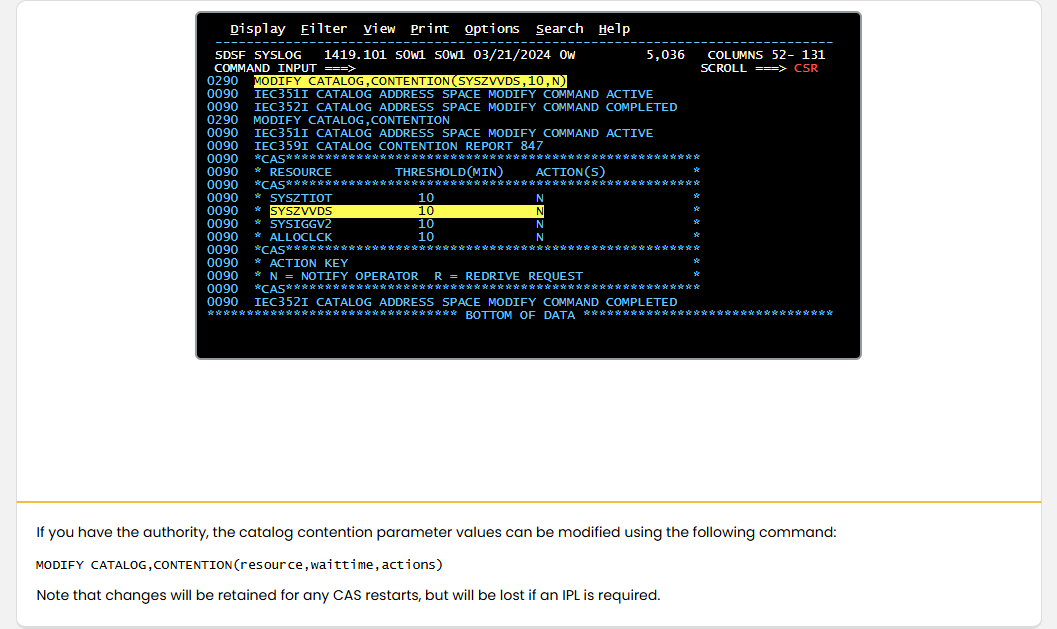
如果您有權限,可以使用下列指令修改型錄競爭參數值:

MODIFY CATALOG,CONTENTION(resource,waittime,actions)

請注意,變更會在任何 CAS 重新啟動時保留,但如果需要執行 IPL,這些變更將會遺失。

Address spaceIPLCatalogSDSF
學習檢核
  • 能用自己的話說明「Modifying Catalog Contention Defaults」在本 topic 中的用途。
  • 能辨識 Address space、IPL、Catalog、SDSF 的基本角色。
  • 能指出畫面中應觀察的欄位、命令區、狀態列或清單。
  • 能判斷本頁內容應回到哪一個大型主機工作情境中使用。
Page 12內容頁1 張圖像1 項補充說明1344 字元

Working with the Catalog Address Space - GRS Contention

Working with the Catalog Address Space Catalog Contention: Working with the Catalog Address Space - GRS Contention screenshot
GRS Contention (content)
圖像補充說明
滑鼠移到上方註記 1

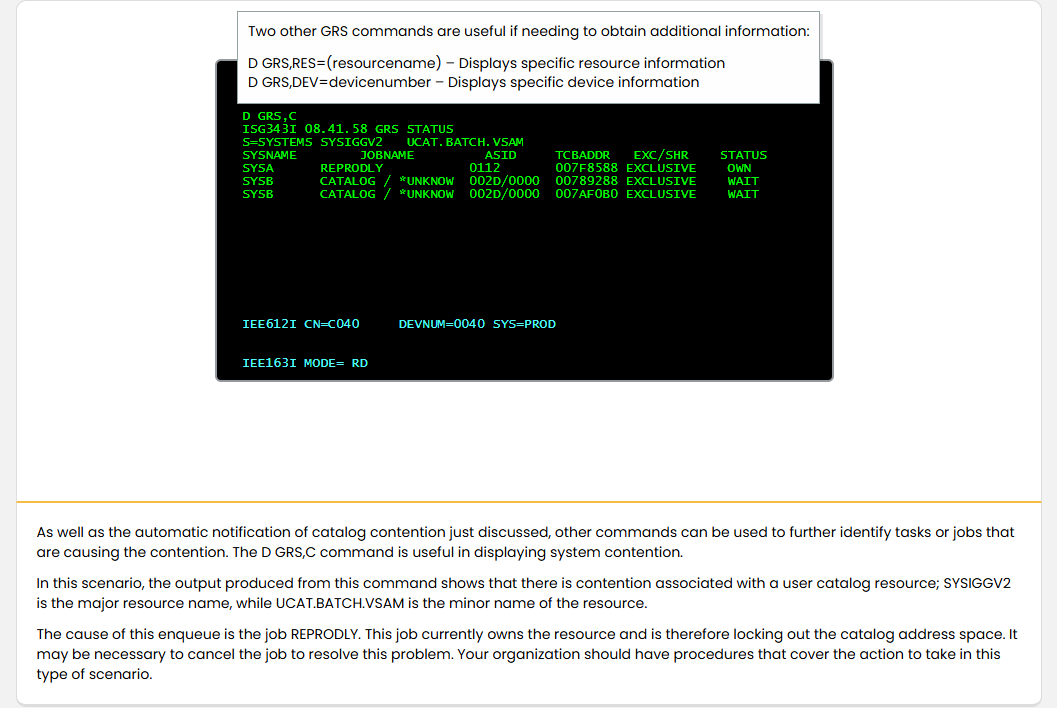
如果需要取得其他資訊,另外兩個 GRS 指令會很有用: D GRS,RES=(resourcename) – 顯示特定資源資訊 D GRS,DEV=devicenumber – 顯示特定裝置資訊

課程正文

D GRS,C

如同剛才討論的型錄爭用自動通知外,還可以使用其他指令進一步識別造成爭用的工作或作業。D GRS,C 指令在顯示系統爭用方面很有用。

在此情境中,該指令的輸出顯示與使用者型錄資源有爭用;SYSIGGV2 為主要資源名稱,而 UCAT.BATCH.VSAM 為次要資源名稱。

造成此鎖定的作業是 REPRODLY。該作業目前擁有該資源,因此鎖住了型錄位址空間。可能需要取消該作業以解決此問題。貴組織應有針對此類情況的作業程序。

Address spaceCatalog
學習檢核
  • 能用自己的話說明「GRS Contention」在本 topic 中的用途。
  • 能辨識 Address space、Catalog 的基本角色。
  • 能把互動圖像中的元件改寫成前後順序清楚的流程說明。
  • 能判斷本頁內容應回到哪一個大型主機工作情境中使用。
Page 13內容頁1 張圖像4 項補充說明1227 字元

Working with the Catalog Address Space - Displaying Active Service Tasks

Working with the Catalog Address Space Catalog Contention: Working with the Catalog Address Space - Displaying Active Service Tasks screenshot
Displaying Active Service Tasks (content)
圖像補充說明
JOBNAME / STEPNAME / PROD500L 及相關項目

目前的工作會以 JOBNAME 與 STEPNAME 列出。

課程正文

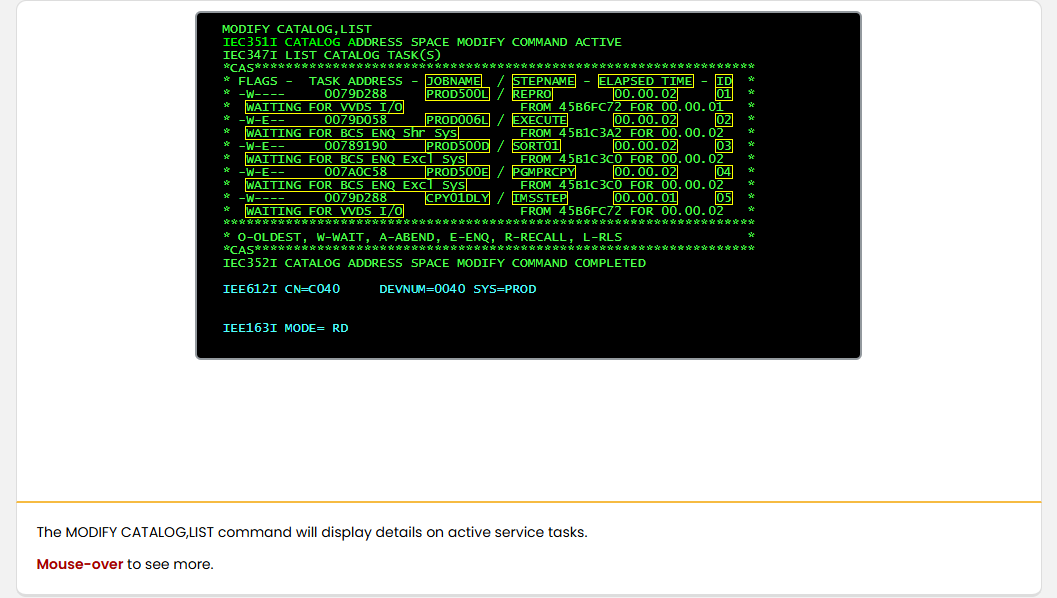
MODIFY CATALOG,LIST

MODIFY CATALOG,LIST 指令會顯示有關活動服務工作的詳細資料。

將滑鼠移到上方以檢視更多。

Address spaceCatalog
學習檢核
  • 能用自己的話說明「Displaying Active Service Tasks」在本 topic 中的用途。
  • 能辨識 Address space、Catalog 的基本角色。
  • 能把互動圖像中的元件改寫成前後順序清楚的流程說明。
  • 能判斷本頁內容應回到哪一個大型主機工作情境中使用。
Page 14內容頁1 張圖像1146 字元

Working with the Catalog Address Space - Displaying Detailed Service Task Information

Working with the Catalog Address Space Catalog Contention: Working with the Catalog Address Space - Displaying Detailed Service Task Information screenshot
Displaying Detailed Service Task Information (content)
課程正文

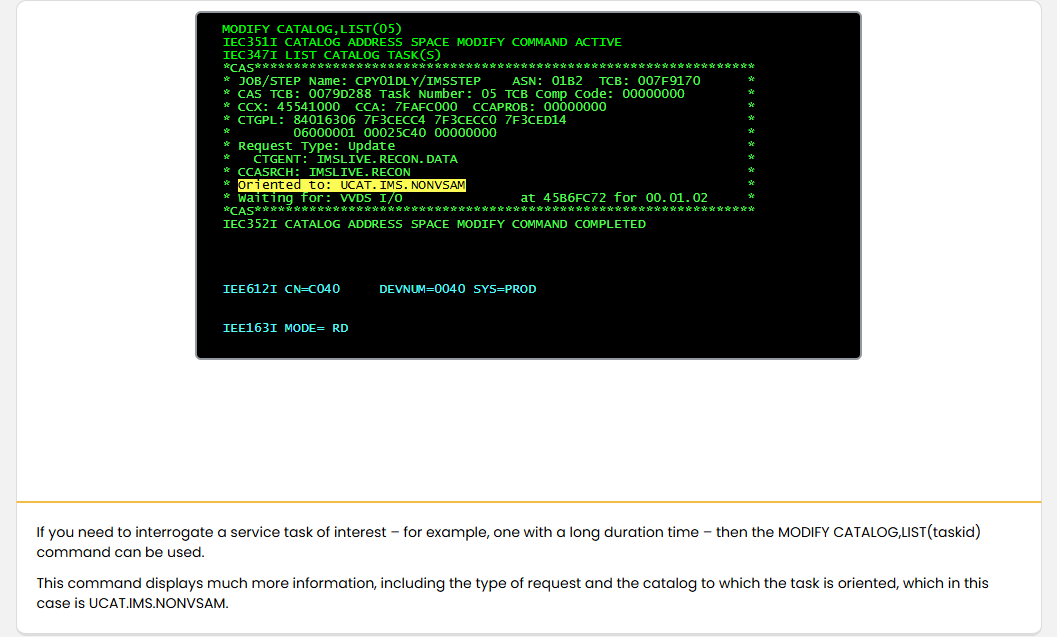
MODIFY CATALOG,LIST(05)

如果您需要查詢特定的服務工作,例如執行時間較長的工作,可以使用 MODIFY CATALOG,LIST(taskid) 指令。

此指令會顯示更多資訊,包括要求類型以及該工作所指向的型錄,本例中為 UCAT.IMS.NONVSAM。

Address spaceCatalog
學習檢核
  • 能用自己的話說明「Displaying Detailed Service Task Information」在本 topic 中的用途。
  • 能辨識 Address space、Catalog 的基本角色。
  • 能判斷本頁內容應回到哪一個大型主機工作情境中使用。
Page 15內容頁1 張圖像3 項補充說明2067 字元

Working with the Catalog Address Space - Displaying Jobname Details

Working with the Catalog Address Space Catalog Contention: Working with the Catalog Address Space - Displaying Jobname Details screenshot
Displaying Jobname Details (content)
圖像補充說明
CCASRCH

這是嘗試在型錄中存取的條目之最後名稱。

課程正文

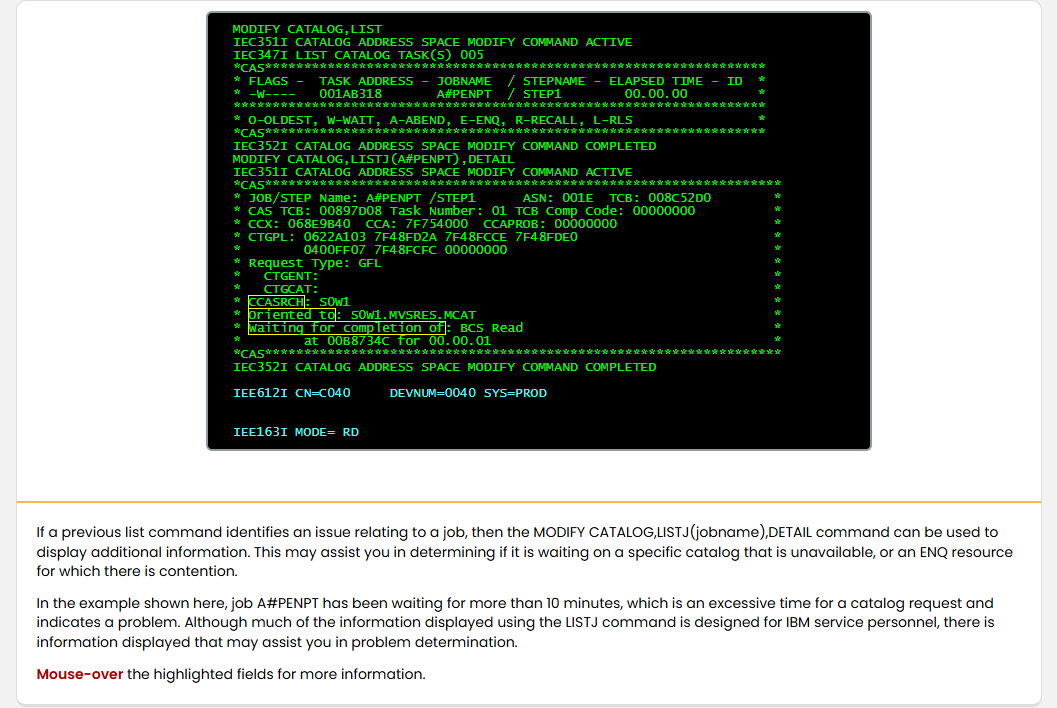
MODIFY CATALOG,LIST

如果之前的 LIST 命令指出與某個作業相關的問題,則可使用 MODIFY CATALOG,LISTJ(jobname),DETAIL 命令來顯示其他資訊。這可協助你判斷該作業是否在等待某個不可用的型錄,或是在等待發生競用的 ENQ 資源。

在此範例中,作業 A#PENPT 已等待超過 10 分鐘,對於型錄要求而言這是過長的時間,表示可能有問題。雖然使用 LISTJ 命令所顯示的大部分資訊是提供給 IBM 服務人員使用,但其中也有一些資訊可以協助你進行問題判斷。

將滑鼠移到標示的欄位以取得更多資訊。

Address spaceCatalog
學習檢核
  • 能用自己的話說明「Displaying Jobname Details」在本 topic 中的用途。
  • 能辨識 Address space、Catalog 的基本角色。
  • 能把互動圖像中的元件改寫成前後順序清楚的流程說明。
  • 能判斷本頁內容應回到哪一個大型主機工作情境中使用。
Page 16圖像內容頁1 張圖像306 字元

Working with the Catalog Address Space - Ending Long Running Tasks

Working with the Catalog Address Space Catalog Contention: Working with the Catalog Address Space - Ending Long Running Tasks screenshot
Ending Long Running Tasks (html-wrapper)
課程正文

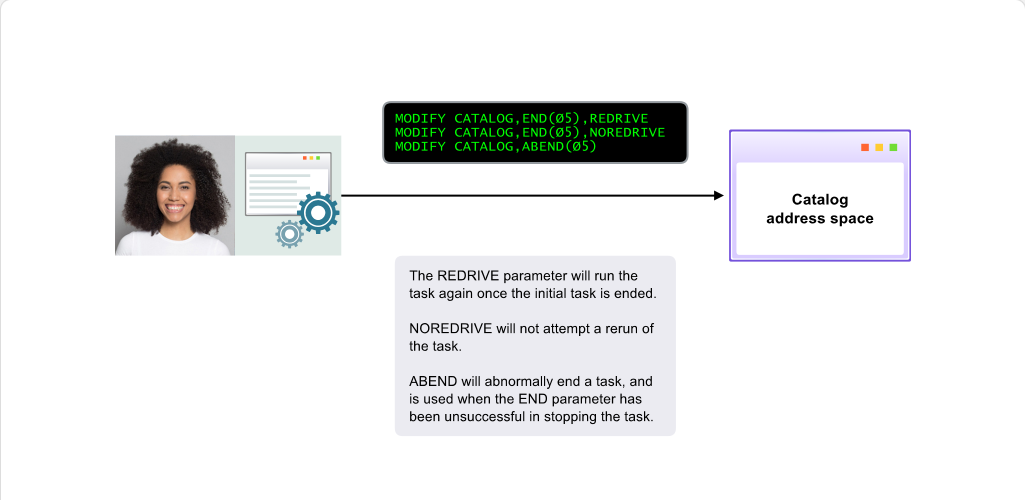
您可能會發現,解決資源死結的唯一方法是移除造成問題的服務任務。視您所需的結果,有數個指令可用來執行此操作:

  • MODIFY CATALOG,END(taskid),REDRIVE
  • MODIFY CATALOG,END(taskid),NOREDRIVE
  • MODIFY CATALOG,ABEND(taskid)
Catalog
學習檢核
  • 能用自己的話說明「Ending Long Running Tasks」在本 topic 中的用途。
  • 能辨識 Catalog 的基本角色。
  • 能判斷本頁內容應回到哪一個大型主機工作情境中使用。
Page 17圖像內容頁1 張圖像298 字元

Working with the Catalog Address Space - Using FORCE

Working with the Catalog Address Space Catalog Contention: Working with the Catalog Address Space - Using FORCE screenshot
Using FORCE (html-wrapper)
課程正文

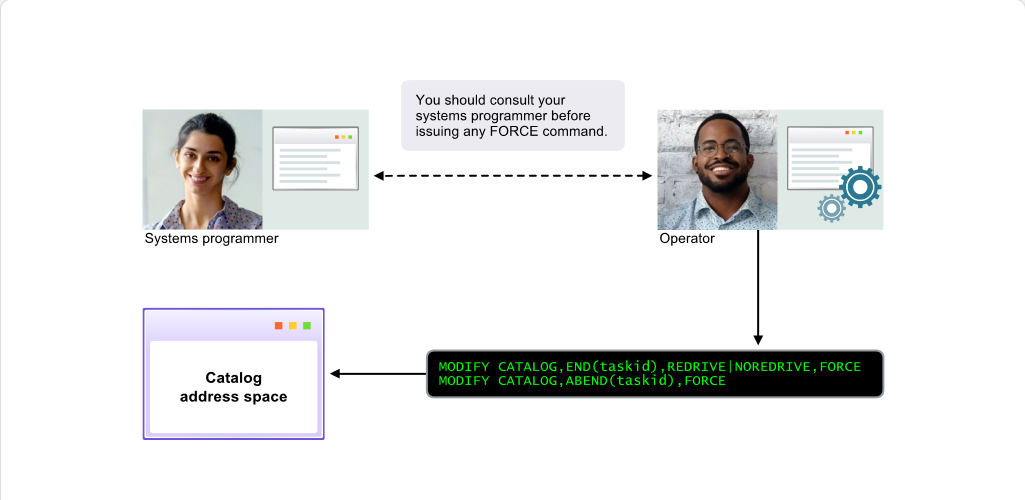
如果前一頁的指令未成功,且該服務工作所代表的位址空間或工作已異常結束,您可能需要使用 FORCE 參數,如下所示:

MODIFY CATALOG,END(taskid),REDRIVE|NOREDRIVE,FORCE MODIFY CATALOG,ABEND(taskid),FORCE

Address spaceCatalog
學習檢核
  • 能用自己的話說明「Using FORCE」在本 topic 中的用途。
  • 能辨識 Address space、Catalog 的基本角色。
  • 能判斷本頁內容應回到哪一個大型主機工作情境中使用。
Page 18內容頁1 張圖像1163 字元

Working with the Catalog Address Space - Dumps

Working with the Catalog Address Space Catalog Contention: Working with the Catalog Address Space - Dumps screenshot
Dumps (content)
課程正文

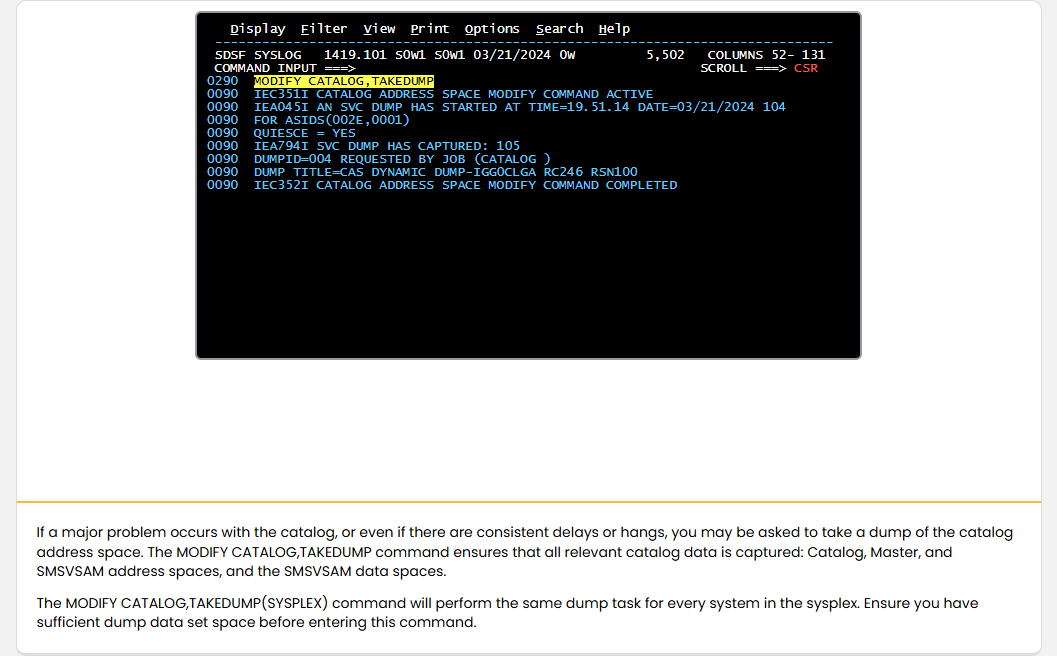
如果 Catalog 發生重大問題,或即使只有持續的延遲或當機,也可能會要求您對型錄位址空間進行傾印。MODIFY CATALOG,TAKEDUMP 指令可確保擷取所有相關的型錄資料:Catalog、Master 與 SMSVSAM 位址空間,以及 SMSVSAM 資料空間。

MODIFY CATALOG,TAKEDUMP(SYSPLEX) 指令會對 sysplex 中的每個系統執行相同的傾印作業。輸入此指令前請確保有足夠的傾印資料集空間。

Address spaceData setCatalogSDSF
學習檢核
  • 能用自己的話說明「Dumps」在本 topic 中的用途。
  • 能辨識 Address space、Data set、Catalog、SDSF 的基本角色。
  • 能指出畫面中應觀察的欄位、命令區、狀態列或清單。
  • 能判斷本頁內容應回到哪一個大型主機工作情境中使用。

Analyzing and Resolving Catalog Problems

Page 20圖像內容頁1 張圖像553 字元

Working with the Catalog Address Space - Introduction

Working with the Catalog Address Space Analyzing and Resolving Catalog Problems: Working with the Catalog Address Space - Introduction screenshot
Introduction (html-wrapper)
課程正文

如果使用到目前為止所討論的技術仍無法解決型錄問題,還有一些其他系統指令可協助您解決問題。

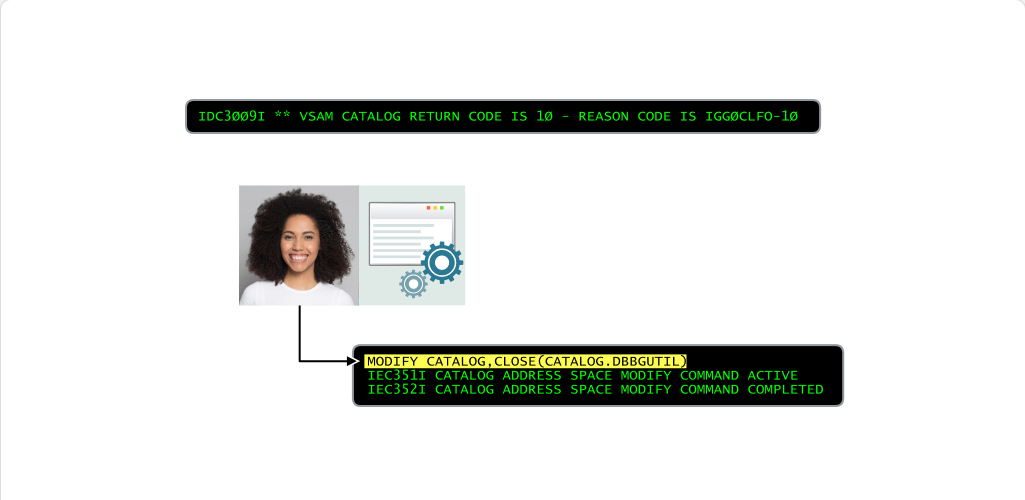
如果訊息指出 CAS 中的某些控制區塊可能已損毀,您可能不需要從備份復原,而是可以直接重建它們。方法是為型錄輸入 CLOSE 或 UNALLOCATE 參數。這會使控制區塊被釋放,並在收到新的型錄請求時自動重建。

Catalog
學習檢核
  • 能用自己的話說明「Introduction」在本 topic 中的用途。
  • 能辨識 Catalog 的基本角色。
  • 能判斷本頁內容應回到哪一個大型主機工作情境中使用。
Page 21圖像內容頁1 張圖像347 字元

Working with the Catalog Address Space - Restarting the CAS

Working with the Catalog Address Space Analyzing and Resolving Catalog Problems: Working with the Catalog Address Space - Restarting the CAS screenshot
Restarting the CAS (html-wrapper)
課程正文

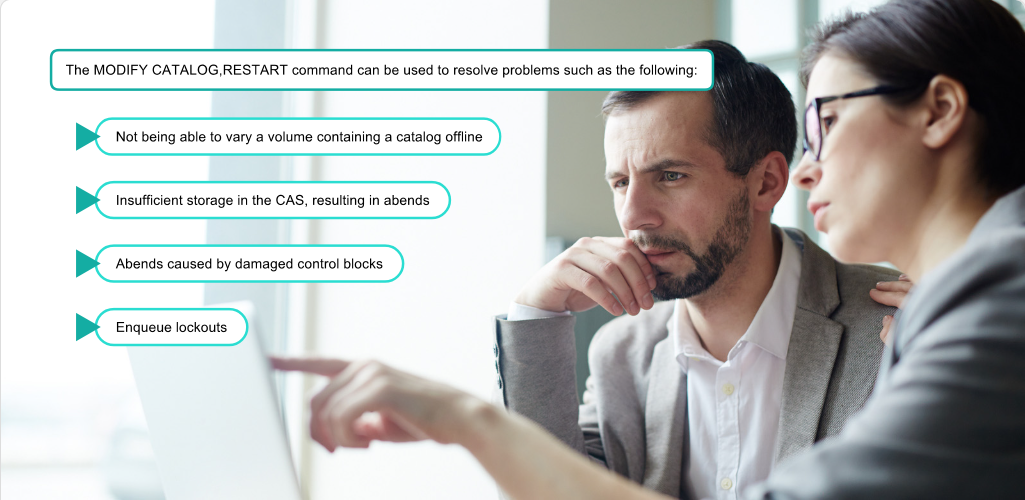
如果型錄錯誤顯示重大問題,您可以考慮使用 MODIFY CATALOG,RESTART 指令重新啟動 CAS。

如果這項做法失敗,最後手段可嘗試執行 FORCE CATALOG,ARM 指令。請注意,應僅在接獲明確指示時執行,因為此操作可能導致型錄永久遺失,並需要對系統執行 IPL。

IPLCatalog
學習檢核
  • 能用自己的話說明「Restarting the CAS」在本 topic 中的用途。
  • 能辨識 IPL、Catalog 的基本角色。
  • 能判斷本頁內容應回到哪一個大型主機工作情境中使用。
Page 23圖像內容頁1 張圖像5 項補充說明255 字元

Working with the Catalog Address Space - Reports

Working with the Catalog Address Space Analyzing and Resolving Catalog Problems: Working with the Catalog Address Space - Reports screenshot
Reports (html-wrapper)
圖像補充說明
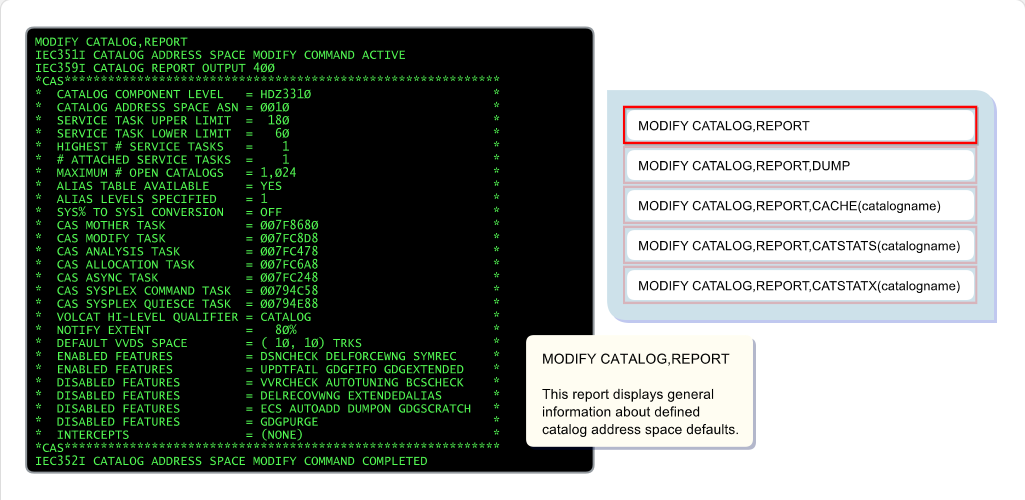
MODIFY CATALOG,REPORT

此報告會顯示已定義的型錄位址空間預設值的一般資訊。

課程正文

除了本模組先前討論的 MODIFY CATALOG,REPORT,PERFORMANCE 指令之外,還有多種其他報告可用於分析型錄活動。

將滑鼠移到指令上方即可檢視所產生資訊類型的說明。

Catalog
學習檢核
  • 能用自己的話說明「Reports」在本 topic 中的用途。
  • 能辨識 Catalog 的基本角色。
  • 能把互動圖像中的元件改寫成前後順序清楚的流程說明。
  • 能判斷本頁內容應回到哪一個大型主機工作情境中使用。

模組完成

Page 28內容頁1 張圖像528 字元

Working with the Catalog Address Space - Module Complete

Working with the Catalog Address Space Module Test: Working with the Catalog Address Space - Module Complete screenshot
Module Complete (content)
課程正文

模組完成:操作型錄位址空間

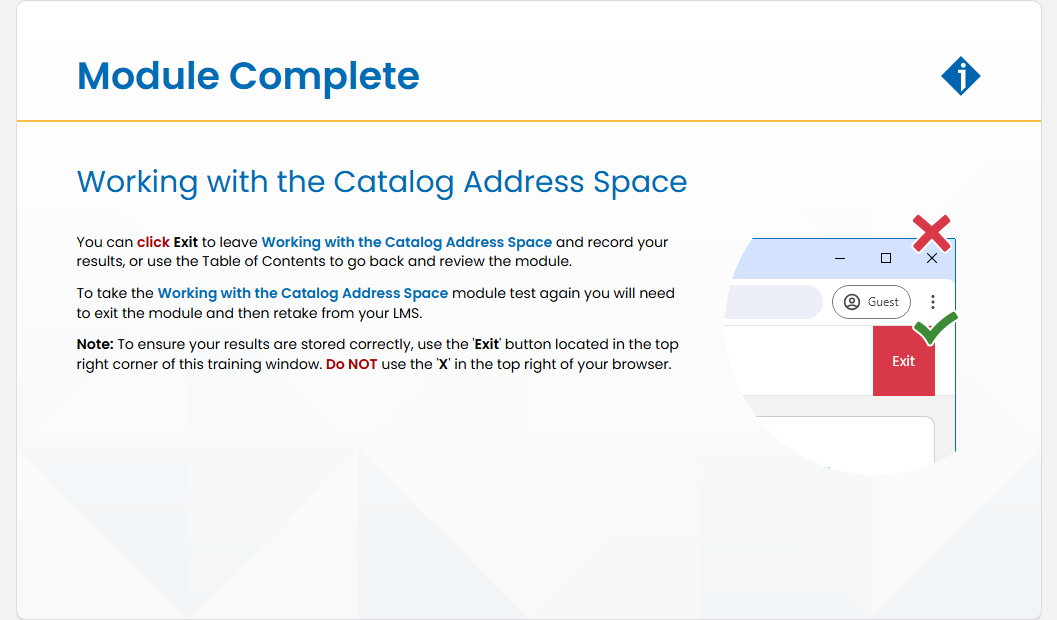
您可以按一下 'Exit' 離開「操作型錄位址空間」並記錄您的結果,或使用 'Table of Contents' 返回並複習本模組。

若要再次參加「操作型錄位址空間」模組測驗,您需先離開模組,然後從您的 LMS 重新參加測驗。

注意:為確保結果正確儲存,請使用位於本訓練視窗右上角的 'Exit' 按鈕。請勿使用瀏覽器右上角的 'X'。

Address spaceCatalog
學習檢核
  • 能用自己的話說明「Module Complete」在本 topic 中的用途。
  • 能辨識 Address space、Catalog 的基本角色。
  • 能判斷本頁內容應回到哪一個大型主機工作情境中使用。

練習與評量

本模組的練習測驗與 Module Test 題目已納入「練習與評量」,可依題型或來源篩選練習。本站以非計分模式提供 25 題練習;正式分數、attempt、completion 與憑證仍以 YourLearnings / InterSkill 為準。

  • 練習測驗:12 題
  • Module Test:13 題

前往練習與評量

IBM Z course transfer site for Taiwan enablement.